

Your online account
Log into your online account to see which funds you’re invested in and check the value of your pension pot.
Everything you need to know about the Deutsche Telekom (UK) Ltd DC Pension Plan

Wherever you are on your savings journey, we want you to have all the tools and information you need to help you reach your retirement goals.
The Plan is part of the Legal & General Mastertrust (the Scheme). The Mastertrust is a defined contribution (DC) pension scheme.
Saving into this pension is a simple, low cost and tax efficient way to save towards your future.
You can join the Plan if you’re age 16 or over. The ways to join are listed below:
You’ll be automatically enrolled if you:
If you don’t meet the automatic enrolment criteria, you can still apply to join by:
Contacting your employer directly and requesting to be enrolled.
If you were part of Money Purchase section of the TMIUKPS and/or have top up DC benefit or AVCs, you’ll be moved to the new Plan from the date your employer provides.
Contact Deutsche Telekom (UK) Ltd for further details on joining.
Opting out - For lots of people, paying into their company pension plan is a great way to save for later in life. However, it may not be right for everyone. If it isn’t the right thing for you, you can opt out of the plan. L&G - This isn't for me
Keep track of your pension anytime, anywhere
Our app puts your workplace pension in your pocket, making it easier than ever to manage your pension whenever and wherever you need to.
The easiest way to manage your pension is through your online account. Once you've registered, you'll be able to see how much is in your pension savings, check how your investments are performing and your fund value. You can also keep important details like your beneficiaries up to date.
Download our app today from the App Store or Google Play.
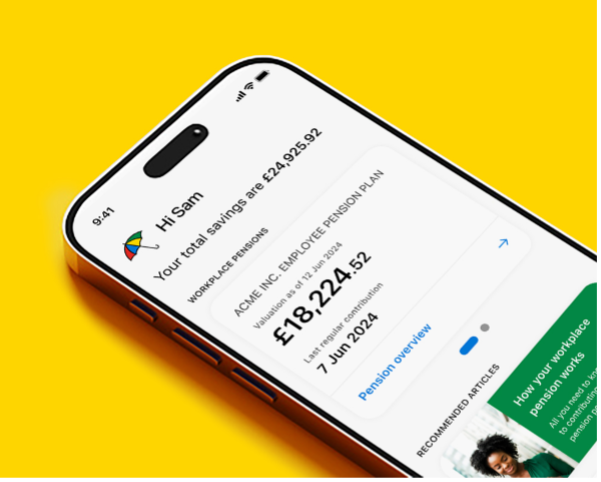
You can make regular and may be able to make one off payments into your plan too using the L&G app or single contribution form – find out more
You can decide what to do with your pension savings, and how you take it from the Normal Minimum Pension Age (NMPA). You can do this whether or not you’ve stopped working. The NMPA is currently age 55 but this is increasing to age 57 from 2028.
You may be able to access your pension savings earlier if you’re in ill health. If you think this applies to you, please contact us.
You can transfer your pension to another provider. You may also be able to transfer in any pension pots savings you have from previous employers.
We’ve covered the key things you need to know about your new plan but we recommend you explore it in more detail using your plan microsite.
You’ll find lots of useful information. Such as:

Log into your online account to see which funds you’re invested in and check the value of your pension pot.
Pension contributions can work differently depending on your scheme. You can check how yours is set up by visiting contributions and tax for further details.
A summary of your contribution rates is shown below.
You choose how much you wish to contribute via salary sacrifice to the Plan. The contributions your employer will make depends on the amount you choose to sacrifice and are shown below.
| You pay | Your employer pays | Total |
|---|---|---|
| (5% salary sacrifice) | 5% | 10% |
| (6% salary sacrifice) | 6% | 12% |
| (7% salary sacrifice) | 7% | 14% |
| (8% salary sacrifice) | 8% | 16% |
| (9% salary sacrifice) | 9% | 18% |
| (10% salary sacrifice) | 10% | 20% |
| (11% salary sacrifice) | 11% | 22% |
| (12% salary sacrifice) | 12% | 24% |
| (12%+ salary sacrifice) | 12% | 24%+ |
If you are an active member of the final salary section of the T-Mobile International UK Pension Scheme, you are not required to pay
contributions to the Plan in accordance with the table above. Instead, your Employer will contribute 1% of your basic salary earnings which
are over £70,000 p.a. calculated as at the most recent 1 April. You can pay contributions to the Plan, but your Employer's contributions to the
Plan will not exceed the 1% described above while you are an active member of the final salary section of the T-Mobile International UK
Pension Scheme.
You can change the amount you pay in to your pension in . You’ll need to tell your employer and they’ll make the adjustments from the next available pay date. You can do this using the Change contribution form.
If you choose to stop making contributions to your pension pot, your employer may/will stop contributing too. This could have a significant impact on the value of your benefits when you come to retire so you should think very carefully before leaving the Plan.
If you have pension savings from other employment, you can usually transfer them into your Plan.
Keeping your pension savings in one place could make them easier to manage but there are a few things you need to consider before you transfer such as the charges for each plan and whether you'll lose any guarantees or benefits by moving your money.
We would always recommend taking financial advice to make sure that transferring is the right thing for you. You can find an adviser in your local area at MoneyHelper. Financial advisers usually charge a fee for their services, but it will be personal to you and your circumstances.
If you decide to go ahead you just need to provide us with your previous pension plan details and we'll do the rest.
Find out more about transferring
When you joined the Plan, your savings were put into the default investment option, which was a Legal & General Cash Target Date Fund.
The Trustees chose the default investment option as it:
You can check which fund you're currently invested in, explore the investment options available to you, and change where your pension savings are invested at any time through your online account or the L&G app.
For more information about your investment options and things to consider before making changes, see Your guide to investing.
To keep your plan running smoothly and manage the funds you’re invested in, we apply two charges:
This covers the cost of running your plan. It’s calculated daily and deducted once a month by selling units from your pension pot.
This covers the cost of managing the fund or funds you’re invested in. This charge is included in the unit price. Unit prices are calculated daily and the charge is reflected in the value of your pension savings.
Using the Target Date Funds as an example, if your pension pot is worth £10,000 throughout the year, you’ll pay the charges shown in the table:
| AMC | 0.03% | £3 |
| FMC | 0.15% | £15 |
| Total charge for the year | 0.18% | £18 |
You can retire and start taking your savings at any time after you’ve reached the minimum pension age regardless of whether or not you’ve stopped working.
If you don’t specify an age we'll assume you plan to start taking your benefits at age 65.
You can update your retirement age at any time, but you should select an age that reflects when you intend to take your benefits.
It’s important to check that your investments are right for you as you approach retirement. You should make sure they reflect how you want to take your money when the time comes.
We’ll be in touch before your retirement date and throughout your pension savings journey to discuss your plans for taking your money and check that your current investment strategy is still suitable.
You can always change your retirement age as your future plans become clearer. You can do this in the L&G app or by logging into your online account and sending us a secure email.
There are lots of planning tools available to you throughout your plan microsite and in your online account. For example, our new guided retirement planner. A service designed to help individuals over 55 make better financial decisions for retirement.
You can access these tools by logging into your online account.
If you want to nominate or change who your pension savings should be paid to in the event of your death, you can do that by simply logging in to your online account and click on Nominate Beneficiaries.
This will make it clear who you'd like your savings to go to if you still have money left in your pension pot at that time. Legal & General has discretion as to who receives the money, but we will take your wishes into account.
You can access your pension savings when you reach your chosen retirement age, or any time from the Normal Minimum Pension Age (NMPA), whether or not you’ve stopped working.
You may be able to access them earlier if your original scheme had a protected retirement age or if you’re in ill health. If you’re close to your chosen retirement age and don’t want to take your pension yet, you can delay taking any money.

MoneyHelper is a free, government organisation that offers guidance to make money and pension choices clearer.
Pension Wise is a government service from MoneyHelper that offers free, impartial guidance about your defined contribution pension options. An appointment with Pension Wise will help you understand what your overall financial situation will be when you retire. You can book an appointment once you are aged 50 or over.

If you have any questions or comments, please contact the L&G helpline as detailed below. If your queries are unresolved, or if there’s something you don’t agree with, there’s a formal dispute procedure you can follow. The helpline can give you all the details.
Open between the hours of 8.30am and 7pm Monday to Friday.
Call charges will vary and the calls may be monitored or recorded.
If you're a former member of the T-Mobile International UK Pension Scheme, you may be able to transfer some or all of your pot back to pay all or some of your tax-free cash.
You will need to contact the defined benefit scheme administrator regarding this before taking any benefits.

If you need help, you can call or email us (please note call charges will vary, we may record and monitor calls)
This page is intended as a summary of the terms and conditions of the Scheme. If the information in the Scheme Rules and here ever conflict with each other, the Rules will be overriding. You can contact Legal & General for a copy of the Rules if you’d like to see them. The information on this page is based on the Trustees’ and Legal & General’s understanding of current legislation, and HMRC practice. These can change without notice, but the Trustees will let you know as soon as they can if a change is made that significantly impacts you.
The following documents are available on request:
For details of who to contact, please get in touch
The Scheme rules may change in future – you’ll be notified of any changes that may affect you.
The Trustees also have the power to wind up the Scheme which would mean you could no longer participate in it. These decisions aren’t taken lightly and should it ever happen, you will be notified well in advance with details of all your options.
The FSCS is designed to pay customers compensation if they lose money because a firm is unable to pay them what they owe for any reason. In the event of a failure of the investments held in the Legal & General WorkSave Mastertrust, the Trustees may, on your behalf, be entitled to claim compensation. The maximum compensation available from the FSCS is 100%, without limit, of a valid claim for any loss incurred.
MoneyHelper is a free, government organisation that offers guidance to make money and pension choices clearer.
Money and Pensions Service
Bedford Borough Hall
138 Cauldwell Street
Bedford
MK42 9AB
Tel: 0800 138 7777 (English)
Tel: 0800 138 0555 (Welsh)
An independent organisation set up by law to investigate and resolve complaints and disputes arising from pension schemes.
The Pensions Ombudsman can be contacted at:
The Office of the Pensions Ombudsman
10 South Colonnade
Canary Wharf E144PU
Tel: 0207 630 2200
The Pensions Regulator regulates workplace pension schemes and can step in where it feels that a scheme is not being run properly or where it has evidence that members’ benefits are endangered. The plan’s administrators and professional advisers have a duty to report to The Pensions Regulator if they believe there have been any irregularities in the way you plan is being run.
The Pensions Regulator can be contacted at:
The Pensions Regulator
Napier House
Trafalgar Place
Brighton BN1 4DW
Tel: 0345 600 0707
The Plan is part of the Legal & General Mastertrust (the Scheme). The Mastertrust is a defined contribution (or money purchase) pension scheme. It is managed by a board of Trustees who are legally bound to look after your money and put your best interests first.
The current Trustees are:
Legal & General Trustees Limited,
LawDeb Pension Trust Corporation PLC, and
Independent Governance Group
If you’d like more information on how the Mastertrust works you can visit the
Mastertrust website
The Trustees appoint Legal & General Assurance Society Limited to administer the Scheme on their behalf.
The scheme is tax-registered with HMRC and the Pension Scheme Tax Reference (PSTR) is 00773690RX.
Deutsche Telekom (UK) Limited.
Orion House, Bessemer Road, Welwyn Garden City, AL7 1HH
dtuk_HR@telekom.com

